- generating a fib spiral
- 2026-02-14
tiling
A clever way to generate a fib spiral is to think of it in terms of vectors. Take the fib sequence
0,1,1,2,3,5,8,13,21...
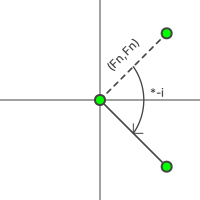
and represent each fib num, Fn, as the vector <Fn, Fn>. In this particular case, it will help us to think of this as a complex vector. So the vector is really Fn + Fn*i: Fn units in the positive real line, and Fn units in the positive imaginary line.
Now we we can multiply it by another complex number, say 0 - i or 0 + i. In these cases we are effectively rotating this vector by 90° either clockwise or counterclockwise, respectively. The image below demonstrates this when multiplying Fn + Fn*i by 0 - i. It only rotates the vector, 90° clockwise, no other transformations are done.
Lastly, we can also rotate by 180° with -1 + 0i along with no rotation using 1 + 0i. Below is a table summarizing this:
| rot | Effect |
|---|---|
1 + 0i | no rotation |
0 - i | rotate 90° clockwise |
-1 + 0i | rotate 180° |
0 + i | rotate 90° counterclockwise |
Using this knowlege we can now take each Fn + Fn*i and cycle through the above table rotations. This will allow us to tile the fib points in a spiral pattern, emanating outward. Using the SVG path and its arc subcommand, we can build the spiral connecting two adjacent fib points (x0, y0) and (x1, y1) like:
<!--
The fib points (x0, y0) and (x1, y1) are opposite corners of a
square with sides of length Fn and diagonal length Fn*sqrt(2).
-->

<path class="arc" d="M ${x0} ${y0} A ${Fn} ${Fn} 0 0 0 ${x1} ${y1}" />
spirals
Below is the result of this tiling pattern using the arc subcommand: we get a satisying spiral. In the second image, the fib squares each have dimension Fn x Fn and illustrate how the arcs are formed, each inside a fib square, connected by the 2 opposite points of the square.

fib spiral, 12 segments
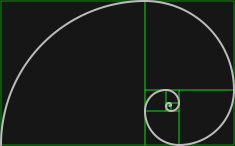
fib spiral, 12 segments, squares
I used fib_spiral_cli.js to generate the two spirals above.